

7MMO
Moderator
If you want to move faster in Grand Theft Auto 6, I can't blame you: There's a lot I've enjoyed about the opening hours I've spent in Jason's shoes. He's handy with a nailgun. He's a good sport when I make him wear the dumbest graphic tees I can find. For a gunslinging drug runner, he's a gentle soul. I just have one complaint.
The man's got a leisurely gait. Which is fine! But there are plenty of times while roaming Leonida when you might wish he and Lucia were moving just a bit faster—just not so fast that you want to force them into a run. Luckily, Rockstar's got our back: There's a setting to bump up your basic movement speed without pushing a button.
(Image credit: Rockstar)
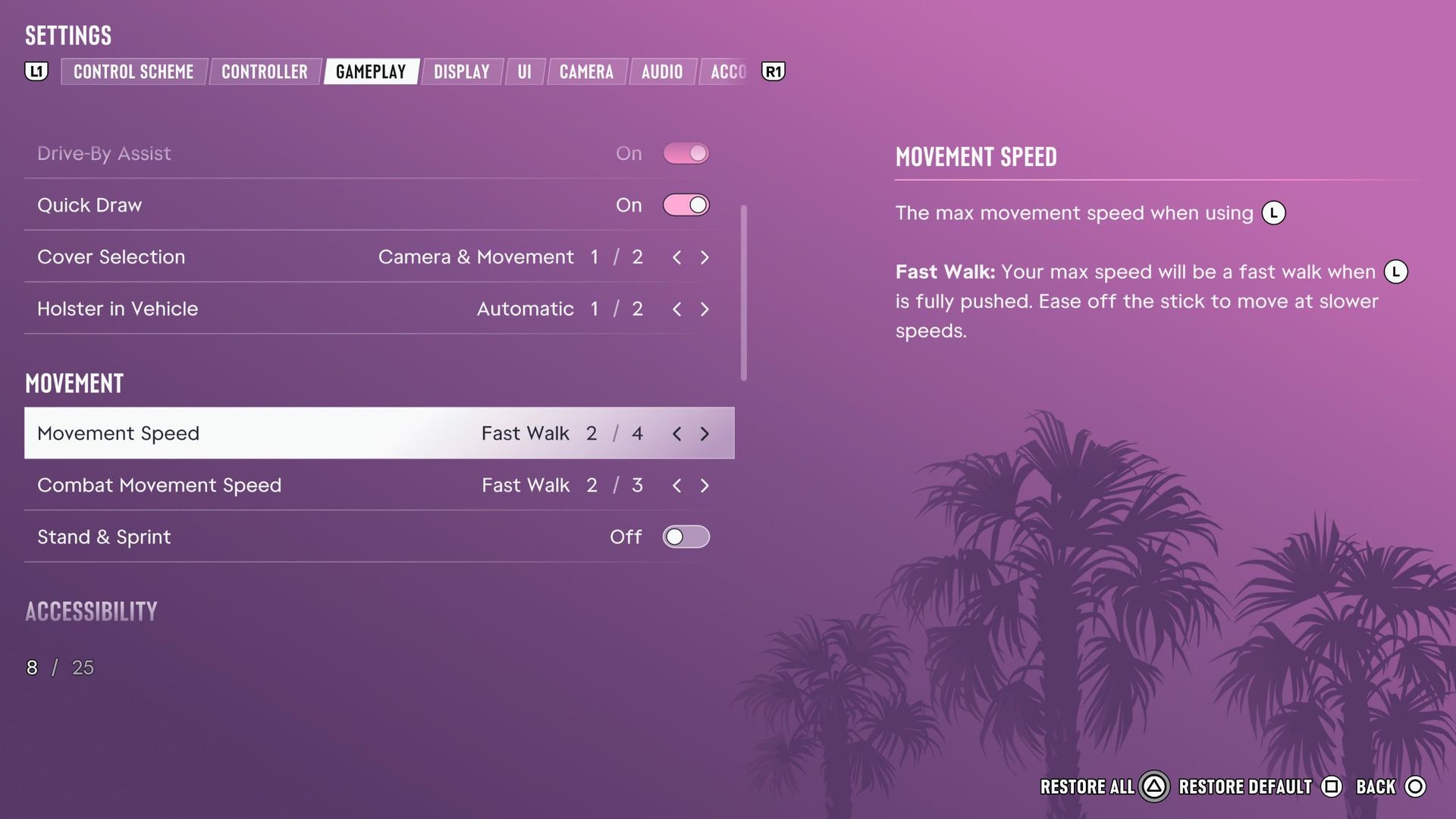
To change the pace that Jason and Lucia move at in GTA 6, head to Settings, move over to the Gameplay tab, and scroll down to the Movement section. The setting you're looking for is Movement Speed.
This doesn't affect your top speed while sprinting and burning stamina. What it adjusts is the speed you move at when you fully push the joystick. There are four options, each one offering more speed than the last: Walk (the default), Fast Walk, Jog, and Run.
It's a nice bit of granularity. I go with Fast Walk to give just a slight bump in my base speed without feeling like I'm rushing, but Jog or Run are good options if you really want to cover ground. Whichever one you choose, you can still voluntarily move at a slower pace by only slightly tilting the joystick.
There's also a Combat Movement Speed setting, which—as you might expect—changes the pace you walk at in a gunfight. There are only three options here: Fast Walk, Jog, and Run, because nobody wants to move slowly when they're actively being shot at.
While you're in the menus, I'd recommend digging around to inspect all the available options. Rockstar included a lot of toggles and tweaks for fine-tuning how GTA 6 handles. You can even turn off vehicle damage altogether, if you don't want to pay for car repairs. Not that I've ever crashed or anything. Don't ask my mechanic.

Grand Theft Auto 6
GTA 6 guide: One-stop info shop
GTA 6 map: The full Vice City tour
GTA 6 cheats: A complete list
GTA 6 radio: All the songs and stations
GTA 6 romance: How to keep a strong bond
Continue reading...
The man's got a leisurely gait. Which is fine! But there are plenty of times while roaming Leonida when you might wish he and Lucia were moving just a bit faster—just not so fast that you want to force them into a run. Luckily, Rockstar's got our back: There's a setting to bump up your basic movement speed without pushing a button.
How to increase your movement speed in GTA 6
(Image credit: Rockstar)
To change the pace that Jason and Lucia move at in GTA 6, head to Settings, move over to the Gameplay tab, and scroll down to the Movement section. The setting you're looking for is Movement Speed.
This doesn't affect your top speed while sprinting and burning stamina. What it adjusts is the speed you move at when you fully push the joystick. There are four options, each one offering more speed than the last: Walk (the default), Fast Walk, Jog, and Run.
It's a nice bit of granularity. I go with Fast Walk to give just a slight bump in my base speed without feeling like I'm rushing, but Jog or Run are good options if you really want to cover ground. Whichever one you choose, you can still voluntarily move at a slower pace by only slightly tilting the joystick.
There's also a Combat Movement Speed setting, which—as you might expect—changes the pace you walk at in a gunfight. There are only three options here: Fast Walk, Jog, and Run, because nobody wants to move slowly when they're actively being shot at.
While you're in the menus, I'd recommend digging around to inspect all the available options. Rockstar included a lot of toggles and tweaks for fine-tuning how GTA 6 handles. You can even turn off vehicle damage altogether, if you don't want to pay for car repairs. Not that I've ever crashed or anything. Don't ask my mechanic.
Grand Theft Auto 6
GTA 6 guide: One-stop info shop
GTA 6 map: The full Vice City tour
GTA 6 cheats: A complete list
GTA 6 radio: All the songs and stations
GTA 6 romance: How to keep a strong bond
Continue reading...
