

7MMO
Moderator
Much to my embarrassment, while I was mid-complaint about my new wall of Valheim storage chests, a fellow Viking hit me with, "You know you can color code those signs, right?" Duh, of course I know that. Well, I swear I did, but totally forgot about the handy feature that doesn't require a single mod. In case you forgot too, I'm here to remind you—or teach you a quick tip for organizing Valheim storage with colorful text codes for signs.
(Image credit: Iron Gate Studios)
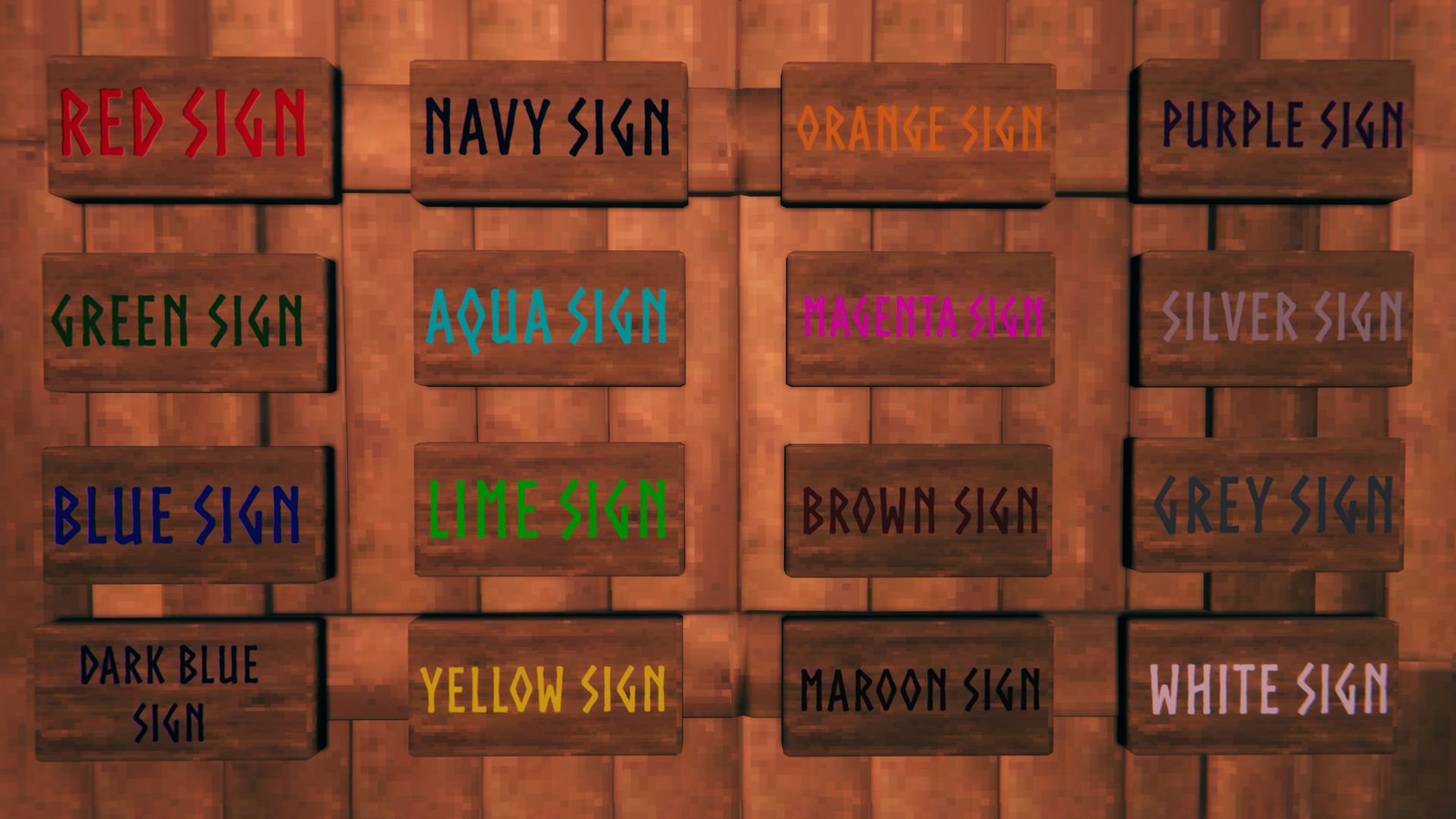
You can change a sign's text color in Valheim through markup codes. For those even vaguely familiar with traditional HTML, you won't need to close these style commands, but keep in mind you still have limited text space on a sign, so keep them short.
You can use any 6-digit hex value, so check out the color code calculator on W3 Docs to find more, or reference the table I used from Unity. It's a fairly straightforward process, but I'll leave you with a few extra color-changing tips:
(Image credit: Iron Gate Studios)
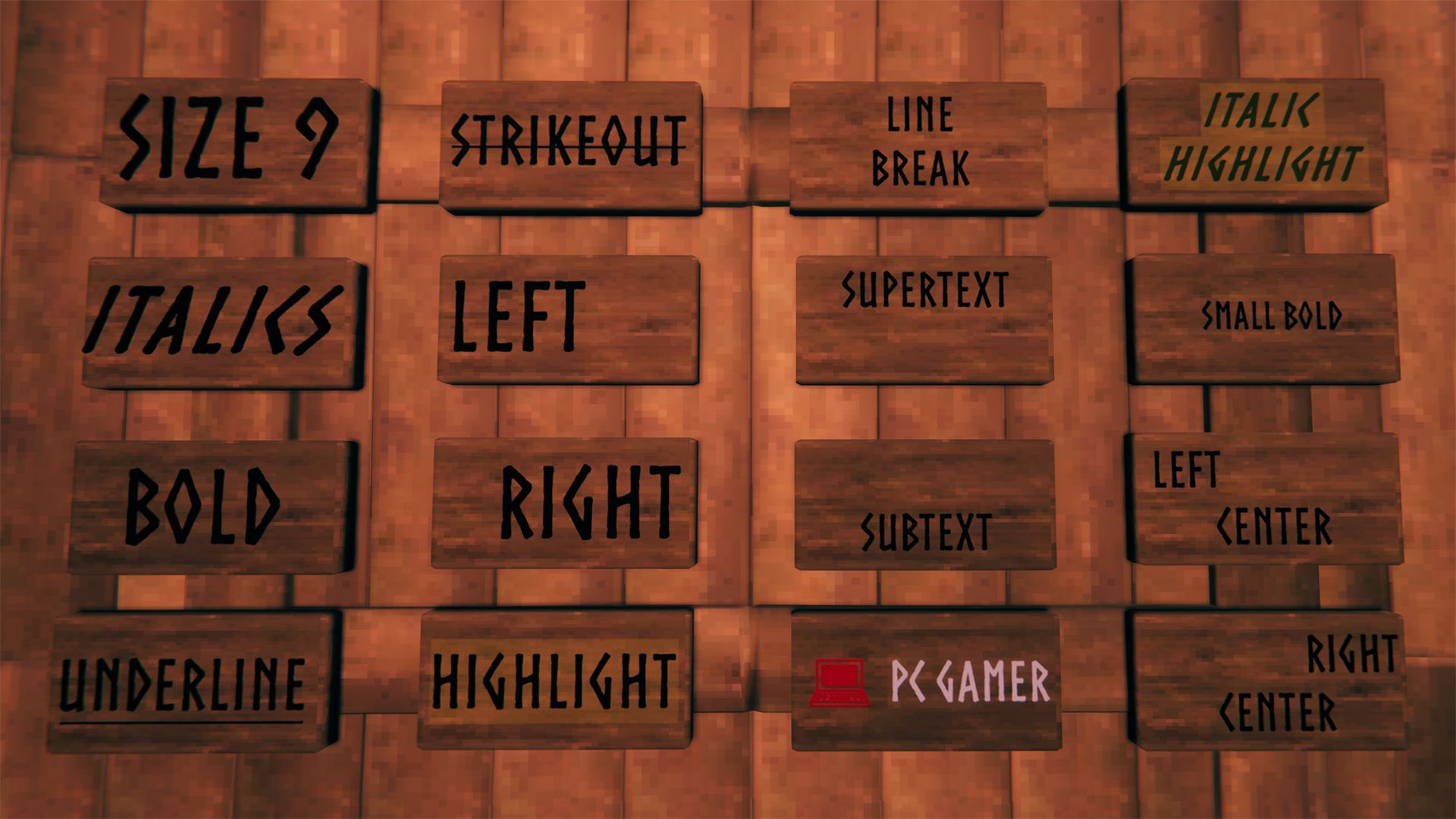
Other markup attributes from the Unity guide also work in Valheim. You can use a few at a time for text styles like bigger italics, colorful bolds, or extra spacing and alignment.
[TR]
[td]
Bold
[/td]
[td]
Bolds sign text (slight difference from default style)
[/td]
[td]
Bolded
[/td]
[/TR]
[TR]
[td]
Underline
[/td]
[td]
Underlines sign text
[/td]
[td]
Underline
[/td]
[/TR]
[TR]
[td]
Strikeout
[/td]
[td]
Strikes line through sign text
[/td]
[td]
Strikeout
[/td]
[/TR]
[TR]
[td]
Align
[/td]
[td]
Moves text to the sides or middle (center is the default alignment)
[/td]
[td]
Left, right, center
[/td]
[td]
Right
[/td]
[/TR]
[TR]
[td]
Highlight
[/td]
[td]
Highlights sign text in yellow
[/td]
[td]
Highlight
[/td]
[/TR]
[TR]
[td]
Line break
[/td]
[td]
Go to next line by placing the code between words
[/td]
[td]
\n
[/td]
[td]
Line \nbreak
[/td]
[/TR]
[TR]
[td]
Supertext
[/td]
[td]
Aligns text to top
[/td]
[td]
Supertext
[/td]
[/TR]
[TR]
[td]
Subtext
[/td]
[td]
Aliens text to bottom
[/td]
[td]
Subtext
[/td]
[/TR]
(Image credit: Iron Gate Studios)
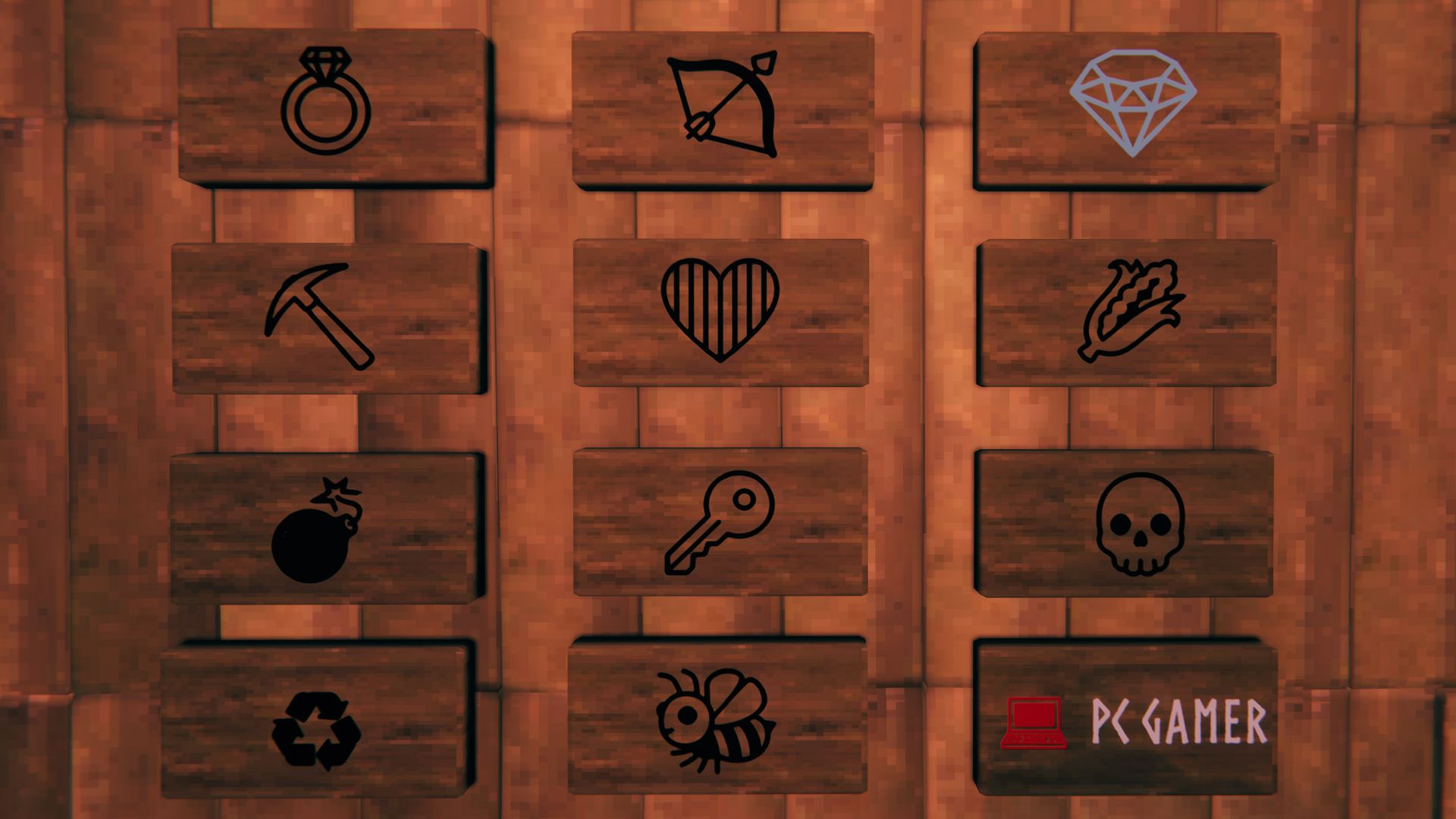
You can take your Valheim signs even further by adding Unicode characters. I find the W3 Schools chart to be the most helpful, but they don't all work, so I've included a few below for reference.
(Image credit: Iron Gate Studios)
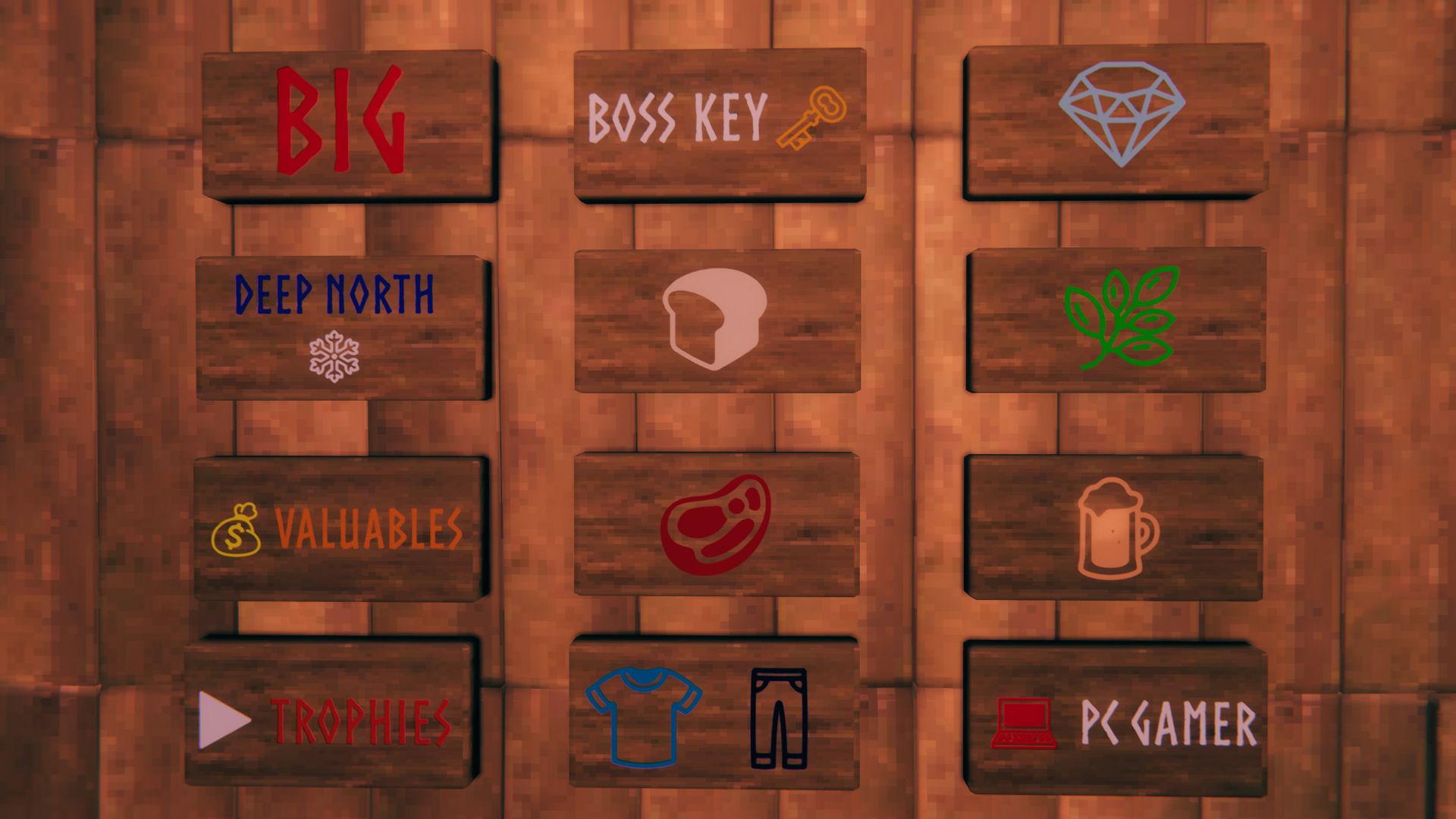
You don't have to stop at just one code when customizing your text, so I've made a few examples you can use to test things out. Change the variables as needed, and remember to heed the 50-character limit—lest your signs wind up with awkwardly cut-off words or floating text.
[TR]
[td]
Color, unicode
[/td]
[td]
White and red text for labeling trophy chests
[/td]
[td]
▶ Trophies
[/td]
[/TR]
[TR]
[td]
Color, unicode
[/td]
[td]
White and orange text to label your boss summoning items with
[/td]
[td]
Boss Key 🗝
[/td]
[/TR]
[TR]
[td]
Color, unicode
[/td]
[td]
Beige unicode symbol for labeling your loaves
[/td]
[td]

[/td]
[/TR]
[TR]
[td]
Color, unicode
[/td]
[td]
Red unicode symbol for labeling uncooked meat
[/td]
[td]

[/td]
[/TR]
[TR]
[td]
Color, unicode
[/td]
[td]
Light and dark blue unicode symbols for labeling gear
[/td]
[td]


[/td]
[/TR]
[TR]
[td]
Color, unicode
[/td]
[td]
Light orange unicode for labeling mead
[/td]
[td]

[/td]
[/TR]
[TR]
[td]
Color, unicode
[/td]
[td]
Green unicode for labeling woodsy materials
[/td]
[td]

[/td]
[/TR]
[TR]
[td]
Color, unicode
[/td]
[td]
Blue unicode for labeling gems
[/td]
[td]

[/td]
[/TR]

Valheim biomes: Follow along zone by zone
Valheim console commands: Godly shortcuts
Valheim inventory upgrades: Deeper pockets
Valheim battle idols: Upgrade your gear
Valheim Grappling Hook: Mistlands made easy
Valheim Intricate Key: A key to the endgame
Continue reading...
Codes for sign colors
(Image credit: Iron Gate Studios)
You can change a sign's text color in Valheim through markup codes. For those even vaguely familiar with traditional HTML, you won't need to close these style commands, but keep in mind you still have limited text space on a sign, so keep them short.
Color | Hex Value | Code |
|---|---|---|
Red | #ff0000ff | Red sign |
Green | #008000ff | Green sign |
Blue | #0000ffff | Blue sign |
Dark Blue | #0000a0ff | Dark Blue sign |
Navy | #000080ff | Navy sign |
Aqua | #00ffffff | Aqua sign |
Lime | #00ff00ff | Lime sign |
Yellow | #ffff00ff | Yellow sign |
Orange | #ffa500ff | Orange sign |
Magenta | #ff00ffff | Magenta sign |
Brown | #a52a2aff | Brown sign |
Maroon | #800000ff | Maroon sign |
Purple | #800080ff | Purple sign |
Silver | #c0c0c0ff | Silver sign |
Grey | #808080ff | Grey sign |
White | #ffffffff | White sign |
You can use any 6-digit hex value, so check out the color code calculator on W3 Docs to find more, or reference the table I used from Unity. It's a fairly straightforward process, but I'll leave you with a few extra color-changing tips:
- Some of the color names listed above work in place of their hex code
- If using a color name, remove '#' and replace it with 'color='
- Example: Red becomes Red sign
Codes for sign text size and style
(Image credit: Iron Gate Studios)
Other markup attributes from the Unity guide also work in Valheim. You can use a few at a time for text styles like bigger italics, colorful bolds, or extra spacing and alignment.
Element | Description | Variables | Code |
|---|---|---|---|
Size | Make sign text bigger or smaller | Recommended #'s: 3 through 12 | Size |
Italics | Italicizes sign text | Italicized |
[td]
Bold
[/td]
[td]
Bolds sign text (slight difference from default style)
[/td]
[td]
Bolded
[/td]
[/TR]
[TR]
[td]
Underline
[/td]
[td]
Underlines sign text
[/td]
[td]
Underline
[/td]
[/TR]
[TR]
[td]
Strikeout
[/td]
[td]
Strikes line through sign text
[/td]
[td]
[/TR]
[td]
Align
[/td]
[td]
Moves text to the sides or middle (center is the default alignment)
[/td]
[td]
Left, right, center
[/td]
[td]
Right
[/td]
[/TR]
[TR]
[td]
Highlight
[/td]
[td]
Highlights sign text in yellow
[/td]
[td]
Highlight
[/td]
[/TR]
[TR]
[td]
Line break
[/td]
[td]
Go to next line by placing the code between words
[/td]
[td]
\n
[/td]
[td]
Line \nbreak
[/td]
[/TR]
[TR]
[td]
Supertext
[/td]
[td]
Aligns text to top
[/td]
[td]
Supertext
[/td]
[/TR]
[TR]
[td]
Subtext
[/td]
[td]
Aliens text to bottom
[/td]
[td]
Subtext
[/td]
[/TR]
Unicode characters for signs
(Image credit: Iron Gate Studios)
You can take your Valheim signs even further by adding Unicode characters. I find the W3 Schools chart to be the most helpful, but they don't all work, so I've included a few below for reference.
Signs | ||||
|---|---|---|---|---|
Arrows | ▲ ▼ ▶ | △ ▽ ▷ ◁ | ︽ ︾ 》 《 | ↑ ↓ → ← |
Hearts and stars |  | ❤ ♥ |   | ☆ ★ |
Signs and transport |     | 🛎 ♻ ⚠ |    | 🛥 |
Tools and weapons |     | ⚔ 🗡 |    | 🗝 ⚒ 🛠 ⛏ |
Food |  |    |     |   |
Nature and weather |    |    |    | ☀ ☁ ☂ ❄ ☃ 🌡 |
Misc |    |   |   |    |
Example Valheim signs
(Image credit: Iron Gate Studios)
You don't have to stop at just one code when customizing your text, so I've made a few examples you can use to test things out. Change the variables as needed, and remember to heed the 50-character limit—lest your signs wind up with awkwardly cut-off words or floating text.
Elements | Notes | Example |
|---|---|---|
Size, color | Big red text, line breaks make some letters float off the sign | Big |
Color, line break, unicode | Blue and white text to label your Deep North chests | Deep North \n❄ |
Color, bold, unicode | Bold orange text with a yellow money bag synmbol | Valuables |
[td]
Color, unicode
[/td]
[td]
White and red text for labeling trophy chests
[/td]
[td]
▶ Trophies
[/td]
[/TR]
[TR]
[td]
Color, unicode
[/td]
[td]
White and orange text to label your boss summoning items with
[/td]
[td]
Boss Key 🗝
[/td]
[/TR]
[TR]
[td]
Color, unicode
[/td]
[td]
Beige unicode symbol for labeling your loaves
[/td]
[td]
[/td]
[/TR]
[TR]
[td]
Color, unicode
[/td]
[td]
Red unicode symbol for labeling uncooked meat
[/td]
[td]
[/td]
[/TR]
[TR]
[td]
Color, unicode
[/td]
[td]
Light and dark blue unicode symbols for labeling gear
[/td]
[td]
[/td]
[/TR]
[TR]
[td]
Color, unicode
[/td]
[td]
Light orange unicode for labeling mead
[/td]
[td]
[/td]
[/TR]
[TR]
[td]
Color, unicode
[/td]
[td]
Green unicode for labeling woodsy materials
[/td]
[td]
[/td]
[/TR]
[TR]
[td]
Color, unicode
[/td]
[td]
Blue unicode for labeling gems
[/td]
[td]
[/td]
[/TR]
Valheim biomes: Follow along zone by zone
Valheim console commands: Godly shortcuts
Valheim inventory upgrades: Deeper pockets
Valheim battle idols: Upgrade your gear
Valheim Grappling Hook: Mistlands made easy
Valheim Intricate Key: A key to the endgame
Continue reading...
